Nothing beats the feeling of reaching a stunning overlook, camera in hand, ready to capture the moment. Then you notice the problem: your shots look shaky, blurry, or crooked. A tripod fixes all of that, but hauling one up a trail and setting it up right takes a little know-how.
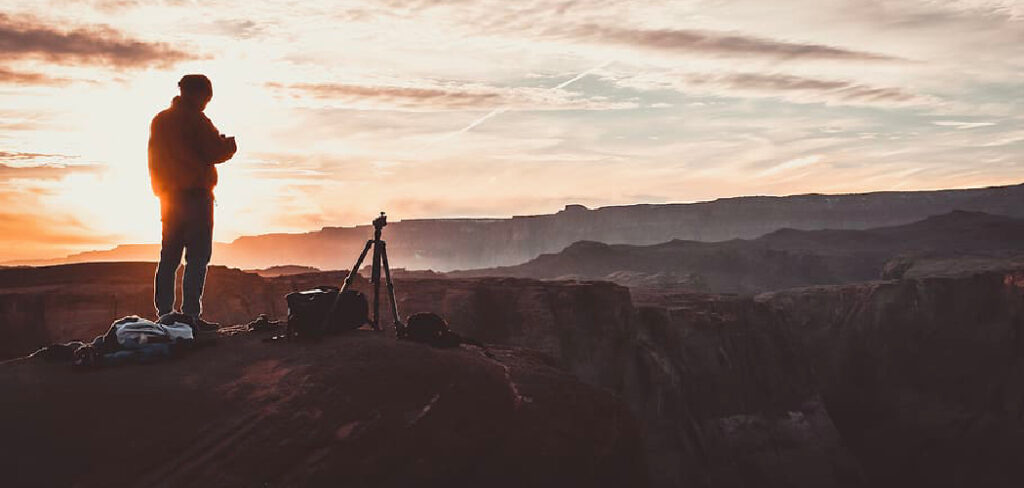
Learning how to use your tripod while hiking helps you turn shaky snapshots into crisp, professional trail photography. You’ll get sharper landscape shots, steadier long exposures, and the freedom to frame your composition exactly how you want. The good news? You don’t need to be a pro or carry heavy gear. This guide walks first-time users through packing, setting up, and shooting with a tripod on the trail, so every hike ends with photos you’re proud to share.
Why Using a Tripod While Hiking Matters
A tripod does one thing above all else: it gives you rock-solid camera stability. That steadiness unlocks shots your hands simply can’t manage. Think silky waterfalls, star-filled night skies, and razor-sharp mountain ridges at golden hour.
For campers and outdoor beginners, this matters more than you’d expect. Low light hits fast in the mountains, and a slow shutter speed means blur unless your camera sits perfectly still. A tripod solves that instantly.
It also frees you up creatively. You can step into your own frame, dial in careful composition, or wait patiently for the light to shift. Instead of rushing handheld shots, you slow down and really see the landscape. That patience is where great nature photography begins, and a good tripod makes it possible.
Tools and Materials You’ll Need
Packing smart makes all the difference on the trail. Here’s what to bring before you head out:
- A lightweight tripod — carbon fiber models weigh less and handle cold better
- A reliable ballhead for quick, smooth angle adjustments
- Your camera with a fully charged battery and spare
- A quick-release plate attached and ready to click in
- A lens cloth to wipe away trail dust and mist
- A carrying strap or clip to attach the tripod to your pack
- Optional: a remote shutter release or cable to avoid camera shake during long exposures
Keep everything accessible so you’re not digging through your bag at the perfect moment. A tidy setup means you shoot faster and enjoy the view longer.
8 Step-by-Step Guide on How to Use Your Tripod While Hiking
Step 1 – Pack Your Tripod the Smart Way
Before you take a single step, secure your tripod properly to your pack. A dangling, loose tripod throws off your balance and snags on branches.
Most hiking packs have side straps or a dedicated pocket that cradles the legs. Slide the tripod in, cinch the straps tight, and give it a firm shake to test. It shouldn’t wobble or shift as you move.

Center the weight close to your spine when you can. This keeps the load balanced and saves your shoulders on long climbs. If your tripod folds down small, tuck it inside the pack instead. Learning how to use your tripod while hiking starts here, because comfortable carrying means you’ll actually bring it out and use it.
Step 2 – Scout Your Location
Once you reach a promising spot, pause and look around before unpacking. The best photos come from thoughtful setup, not rushed grabs.
Study the scene with your eyes first. Notice where the light falls, how shadows stretch, and what natural lines pull your gaze. A winding trail, a jagged ridge, or a lone tree can anchor your composition beautifully.
Feel the ground beneath your boots too. You’ll want solid footing for both you and your tripod. Loose gravel and soft mud spell trouble later. Walk a few steps in each direction and check how the framing changes. Taking two minutes to scout saves you from settling for a mediocre angle you’ll regret.
Step 3 – Find Stable Ground
Your tripod is only as steady as the surface holding it. Hunt for firm, level ground before you extend a single leg.
Rock slabs, packed dirt, and hard-packed trails work great. Avoid loose sand, mud, and wobbly stones that shift under pressure. If the ground slopes, plant two legs downhill and one uphill for balance.
Press each foot firmly into the earth once you set it. You should feel the tripod bite into the surface and hold. Give the whole rig a gentle nudge to confirm nothing sinks or slides. On soft terrain, some tripods have spiked feet that dig in for extra grip. Solid footing here prevents the frustration of a tipped camera later.
Step 4 – Extend the Legs Correctly
Now open the legs, starting with the thickest sections first. These upper segments are sturdier and give you better stability than the thin lower ones.
Release each leg lock, pull the section to your desired height, then snap the lock shut firmly. You’ll hear a satisfying click when it’s secure. Tug gently to double-check before trusting your camera to it.
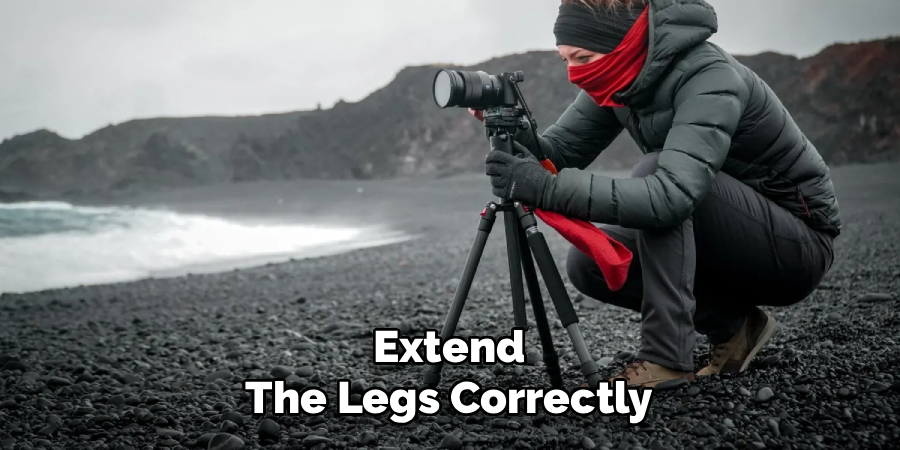
Only extend the skinny bottom legs if you truly need the extra height. They flex more in wind and reduce overall steadiness. Keep the center column low too, since raising it high makes the whole setup top-heavy and shaky. A wider, lower stance almost always beats a tall, precarious one for sharp landscape shots.
Step 5 – Mount Your Camera
With the legs locked and steady, it’s time to attach your camera. Slide the quick-release plate into the ballhead until it clicks firmly into place.
Give the camera a light wiggle to confirm it’s locked. A loose mount is the fastest way to send expensive gear tumbling onto the rocks. Tighten the release lever fully before letting go.
Feel the weight settle onto the tripod as your hands come free. That’s the moment steady shooting begins. Position the camera over the sturdiest leg if there’s any breeze, which adds balance. Double-check the strap isn’t flapping in the wind, since even that tiny movement can blur a long exposure. Now you’re ready to compose your shot with confidence.
Step 6 – Level and Frame Your Shot
Loosen the ballhead and gently guide your camera into position. This is where good composition comes alive, so take your time.
Watch your horizon line closely. A tilted horizon nags at the eye, so use your camera’s built-in level or grid lines to keep it straight. Line up your key subject using the rule of thirds for a balanced, natural feel.
Once the framing feels right, lock the ballhead down tight. The camera should hold its exact position without drifting. Look through the viewfinder or screen one more time and scan the edges for stray branches or distractions. Small adjustments now make a huge difference. Knowing how to use your tripod while hiking means using this stability to perfect every detail.
Step 7 – Adjust Your Camera Settings
With your camera locked and framed, turn your attention to the settings. This is where the tripod really earns its keep.
Because your camera sits perfectly still, you can drop to a slow shutter speed without any blur. That opens the door to long exposure magic, like smooth flowing water or soft, moving clouds.
Set a low ISO for clean, crisp image quality since you’re no longer fighting camera shake. A narrow aperture keeps more of your landscape in sharp focus front to back. If you brought a remote shutter release, use it now. Even pressing the button by hand can jiggle the camera, so a remote or the two-second timer keeps everything tack-sharp.
Step 8 – Shoot, Review, and Pack Up
Fire off your first shot, then check the result on your screen right away. Zoom in and inspect the sharpness, exposure, and framing carefully.
If something looks off, adjust and shoot again. This is the beauty of a tripod. Your framing stays locked, so you can fine-tune settings between shots without losing the composition.
Once you’ve captured the shot you want, pack up thoughtfully. Remove the camera first and stow it safely. Then collapse the legs, wipe off any dust or moisture, and secure the tripod back onto your pack. Leaving a spot clean and taking your time protects both your gear and the trail for the next hiker to enjoy.
Common Mistakes When Using a Tripod While Hiking
Even eager beginners stumble into the same traps, and most are easy to avoid once you know them. The biggest mistake is buying or bringing a tripod that’s far too heavy. A bulky aluminum monster feels fine in the store, but three miles up a mountain, you’ll leave it in the pack. A lightweight tripod, ideally carbon fiber, gets used because it’s actually pleasant to carry.
Another frequent error is extending the thinnest leg sections first. Those skinny bottom legs flex and wobble, ruining your camera stability. Always open the thick upper sections first and save the narrow ones for when you truly need extra height.
Many newcomers also crank the center column up high to gain height. This makes the whole setup top-heavy and shaky, especially in wind. Keep that column low and spread the legs wider instead.
Forgetting to check the ground is another classic slip. Setting up on loose sand or mud leads to a slow, frustrating sink that blurs your shots. Finally, plenty of people press the shutter by hand and wonder why their long exposure looks soft. Use a timer or remote to eliminate that shake entirely.
Expert Tips
Want to level up your trail photography fast? Start by shooting during the golden hours, just after sunrise or before sunset. The soft, warm light flatters landscapes and pairs beautifully with the steady shots your tripod enables.
Weigh down your tripod in windy conditions by hanging your pack from the center hook, if yours has one. That extra ballast keeps everything rock steady for crisp long exposures.
Practice setting up at home before your trip. When you can open and lock your tripod in seconds, you’ll catch fleeting light on the trail instead of fumbling with leg locks.
Finally, protect your investment. Wipe grit off the leg joints after dusty hikes so the locks keep gliding smoothly for years of adventures.
Frequently Asked Questions
How heavy should a hiking tripod be?
Aim for a tripod under three pounds if you can. Anything heavier becomes a burden on long trails, and you’ll be tempted to leave it behind. Carbon fiber models offer the best balance of strength and low weight, though they cost more. For casual hikers, a compact travel tripod around two pounds handles most cameras and packs down small enough to strap onto any daypack.
Can I use a lightweight tripod with a heavy camera?
Yes, but check the weight rating first. Every tripod lists a maximum load it can safely support, including your camera and lens. Stay comfortably under that limit for the steadiest results. A lightweight tripod paired with a heavy DSLR can work fine on calm days, but in wind, add stability by hanging your pack from the center hook and keeping the legs spread wide and low.
Do I really need a ballhead for hiking?
A ballhead isn’t strictly required, but it makes trail shooting far easier. With one quick twist, you can tilt, pan, and level your camera in any direction, then lock it instantly. That speed matters when the light is changing fast. Ballheads are also compact and lightweight, making them ideal for hiking. Most photographers find them faster and more intuitive than traditional pan-tilt heads out in the field.
How do I keep my tripod steady in wind?
Start by lowering the center column and spreading the legs wide for a stable base. Many tripods have a hook beneath the center column, so hang your backpack there for extra weight. Position yourself to block the wind if you can, and avoid raising the thin leg sections. Finally, use a remote or timer, since even a gentle breeze plus a hand press can blur your long exposure.
What camera settings work best with a tripod?
Because your camera stays perfectly still, you can use a low ISO for clean, noise-free images. A slow shutter speed becomes possible without blur, which is perfect for long exposures of water or clouds. Choose a narrow aperture, like f/8 to f/11, to keep your whole landscape sharp. Pair these settings with a two-second timer or remote release to avoid any shake when you press the shutter.
Conclusion
Bringing a tripod on your hikes opens up a whole new world of photography. Once you master the routine, it becomes second nature and barely slows you down. Pack it securely, scout your location, and find firm, level ground before setting up. Extend the thick legs first, mount your camera safely, and take your time leveling and framing the shot. Then let that steady base work its magic with a low ISO and a slow shutter speed for stunning long exposures.
Steer clear of the usual mistakes too. Skip the heavy gear, keep the center column low, and always use a timer or remote to lock in sharp results. A little patience and preparation reward you with crisp, professional landscape shots every single time.
Now that you know how to use your tripod while hiking, you’re ready to capture the trails the way you truly see them. Grab your gear, head for the hills, and turn those breathtaking views into photos you’ll treasure for years to come.

About Caleb
Caleb Merritt is a Virginia-based outdoor writer and gear analyst who has spent over a decade sleeping on the ground, crossing mountain passes, and obsessively shaving grams off his pack weight. He holds a Bachelor of Science in Environmental Science from James Madison University, where he also served as president of the university’s outdoor recreation club. After graduating, he spent three years as a wilderness educator with a backcountry youth program in the Shenandoah Valley — teaching Leave No Trace ethics, backcountry navigation, and campcraft — before moving into full-time writing in 2018.
His work focuses on one core belief: the best gear is the gear you understand. Whether he’s doing a side-by-side weight comparison of ultralight shelters or writing a beginner’s guide to building a sub-20-lb base weight kit, Caleb writes with the same directness you’d expect from a trusted trail partner. He has logged more than 4,000 miles across iconic routes including the John Muir Trail, the Wind River Range, Vermont’s Long Trail, and the Collegiate Peaks Loop in Colorado.
Areas of Expertise
- Ultralight backpacking systems and base weight optimization
- Tent, tarp, and shelter testing across three-season and shoulder-season conditions
- Sleeping bag and quilt temperature rating verification
- Backpacking nutrition, meal planning, and calorie-per-ounce analysis
- Leave No Trace principles and wilderness ethics
- Campfire safety, bear country protocols, and water treatment methods
- Gear care, repair, and long-term durability assessment
Education
James Madison University — B.S. in Environmental Science, 2015
During his time at JMU, Caleb served as President of the Outdoor Recreation Club, where he planned and led more than 30 backcountry trips annually across the Blue Ridge Mountains and Appalachian Trail corridor. The role sharpened his ability to assess gear performance under real conditions, manage group safety in remote environments, and develop the kind of practical trail knowledge that no classroom can teach.
Professional Experience
Gear Writer & Senior Contributor — [campeox.com]
Produces in-depth gear reviews, buyer’s guides, and how-to content across backpacking, camping, and ultralight hiking categories. Tests all gear in real field conditions before publishing recommendations.
Wilderness Educator & Trip Leader — Shenandoah Backcountry Youth Program — 2015–2018 Led multi-day backcountry expeditions for teens and young adults throughout Shenandoah National Park and George Washington National Forest. Taught LNT principles, orienteering, first aid awareness, and campcraft fundamentals.
Outdoor Recreation Club President — James Madison University — 2013–2015 Organized and led university-sponsored hiking, backpacking, and camping trips in the Blue Ridge Mountains and Appalachian Trail corridor. Managed club budget, safety protocols, and trip logistics for a membership of 120+ students.
Editorial Standards
Every piece of gear Caleb recommends has been personally tested in the field — not just unboxed and described. His review process includes a minimum of two overnight trips per shelter, a full-season evaluation for sleep systems, and side-by-side comparisons wherever possible. He does not accept payment for positive reviews. Affiliate relationships, where they exist, are always disclosed in accordance with FTC guidelines.
All factual claims about gear specifications, trail distances, and safety recommendations are cross-referenced against manufacturer data sheets and established sources such as the Leave No Trace Center for Outdoor Ethics and the American Hiking Society before publication.